Alright, I’m sorry about the headline but when it’s the main marketing feature of the product…it’s hard not to. Anyway, onto the review…
You probably know PowerA as one of the leading brands in the third-party-controller space. I’ve covered a few controllers of theirs in the past, and now we’re back with the latest iteration of their premium Xbox controller: The Fusion Pro. So what makes this controller the controller? Well, I’ll tell you…
Disclaimer: PowerA was kind enough to send over a review sample of the Fusion Pro Wireless, but they do not have any influence on the contents of this review nor were we paid for this review.
PowerA Fusion Pro Wireless

So what’s the difference between the Fusion Pro Wireless and every other PowerA Xbox controller on the market?
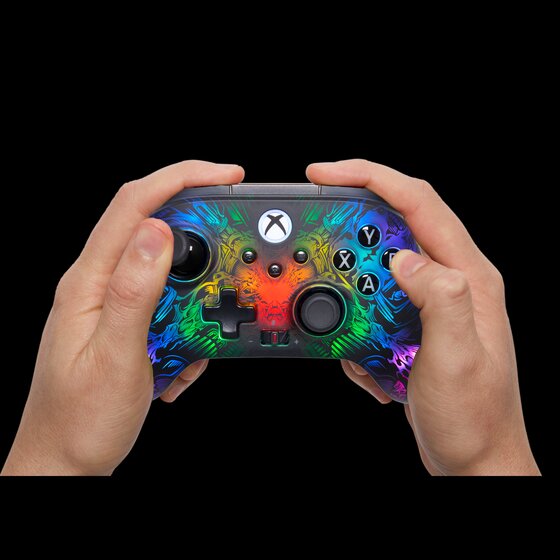
Well, as you can probably tell…it has the most RGB I think I’ve ever seen on a gaming peripheral in my life. I mean, sure, keyboards might objectively have more RGB in terms of the actual amount of RGB, but I think the Fusion Pro Wireless has them all beat in regards to the “thing-to-RGB” ratio.
Lumectra
PowerA has taken to calling the full-body RGB in the Fusion Pro “Lumectra” and it’s only available on the Fusion Pro Wireless Xbox controller. Well, kind of.
Lumectra itself has its own category on PowerA’s website, and there are several other products that include Lumectra, but the Fusion Pro Wireless is the only one where it actually covers the entire surface of the product.
READ MORE: Reolink has turned me into a monitoring mogul and I love it
So what’s the deal with Lumectra? Well, I’m pretty sure its entire purpose is to hook in the “RGB or bust” gamers that have little interest in anything that doesn’t light up the room with a million bright glowing colors.
That isn’t to hate on RGB though, I totally get it — RGB is cool (though not really my thing nearly as much as it used to be). I’m also not hating on the Fusion Pro Wireless either; just because a gimmick is a gimmick (and it is), doesn’t mean it’s a bad one. (Plus, if you don’t like it you do have the ability to just turn it off, which I do always appreciate).
I’m actually a big fan of the RGB-gimmick of the Fusion Pro Wireless. It’s a damn cool controller to look at and genuinely just appreciate. There’s a fair bit of customization for it as well. However, I believe that this latest iteration of Lumectra might be PowerA’s test run of a potential fully-customizable controller aesthetic.
I wouldn’t be shocked if we start to see Lumectra evolve down the road to allow users to be able to fully customize the RGB on their controllers with custom graphics. Maybe even a community “marketplace” of sorts that allows for said graphics to be uploaded for anyone to use for themselves.
Do I think that’s a possibility? Absolutely. Do I think it’ll be here anytime soon? Probably not, I think it’ll depend entirely on the sales and response to any upcoming and current Lumectra devices.
Other features
So we’ve covered the headline feature of the Fusion Pro Wireless, what else does it offer?
Thumbsticks
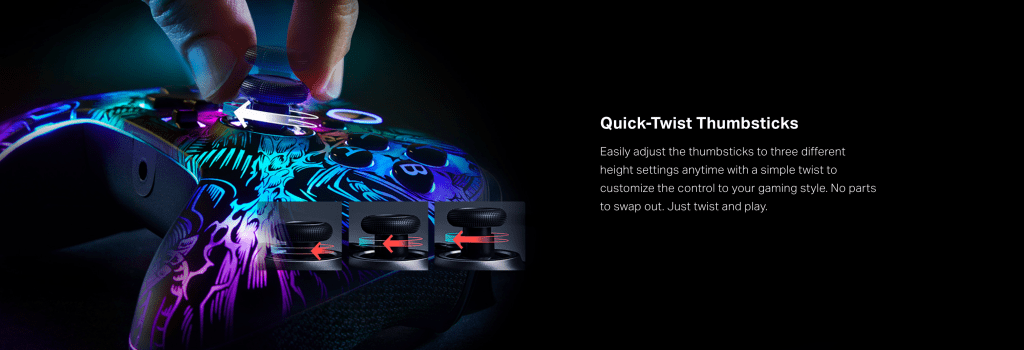
The Fusion Pro Wireless has most of your typical pro-controller features including adjustable thumbsticks; however, instead of including a few different sets of thumbsticks to swap in and out, PowerA actually uses an alternative they’ve dubbed “Quick-Twist Thumbsticks.”
These thumbsticks adjust simply by twisting and locking into place at one of three different height settings without any tools. This is a really great concept that I think more companies should adopt, because I can almost guarantee most people with controllers who use pro controllers that require tools to adjust probably choose one thumbstick set and roll with it forever because either A. They can’t be bothered to pull out the tools or B. Those tools get lost within a week.
I know I have never bothered to swap out the thumbsticks on my Elite Series 2 controller and that doesn’t even need tools! I just can’t be bothered to go look for the other sets of thumbsticks in my closet.
READ MORE: The Glorious GMMK 2 is one of the best keyboards I’ve ever used
The Fusion Pro Wireless also features hall-effect thumbstick modules that should mitigate just about all stick-drift and help your controller last longer. On top of that, it includes a low-latency wireless USB dongle that allows you to plug-and-play on Xbox and PC with minimal input lag.
Buttons and Triggers
It’s not a pro controller if it doesn’t include some input options on the back, right? Well the Fusion Pro Wireless gives you four mappable buttons on the back of the controller.
These buttons can be programmed on-the-fly mid-game without requiring any software.
I’m gonna be honest here: I’m more of a paddle guy (not really sure why, it’s just kinda what I prefer), but I’m not entirely opposed to buttons. While I didn’t dislike them at first, the more I used the Fusion Pro Wireless the more I found some issues with the back buttons.
Not really a huge fan of the placement of the buttons, often I found when I would go to press a button that I would actually end up pressing both buttons on one side because they’re so close together. They also just feel a bit cheap and hollow when they’re used, which just doesn’t feel very great.
The triggers include three sensitivity options that cover just about whichever kind of game you might play. Need the quickest trigger pull to get that headshot off in COD? You got it. How about the satisfaction of pulling back a bow and arrow in Assassins Creed or Skyrim? Yep, that too. Well….sort of.
Unfortunately, I can’t really feel a whole heck of a difference between any of the sensitivity settings like I can with the Elite Series 2. I guess it’s nice that it’s there, but ultimately feels pretty useless if I can’t tell the difference between any of the settings.
Accessories
The Fusion Pro Wireless comes with a few accessories including a wireless charger, and a carrying case. (No, I am not counting the USB-C cable as an accessory since it’s necessary to use the controller).
I love the charger. It magnetically attaches to the back of the controller and it’s a lot more secure than I expected it would be. Of course, you’re not going to be able to toss the thing around and have the controller stay on it, but it’s enough to keep it safe from accidentally being knocked off the stand (depending on how hard you knock it).
The carrying case is also a nice touch; it’s a soft-shell case which may be disappointing to some as it’s a lot easier to damage the controller with them as opposed to a hard-shell protective case, but I feel like you’ve really gotta put it through the ringer to do any sort of legit damage.
Comfort
Right out of the box, I felt comfortable using the Fusion Pro Wireless controller. It doesn’t have the heft of an Elite Series 2, which I’m sure will be a positive for most people, especially competitive players, so I’m counting that as a +1 for PowerA, even though I prefer a controller with a bit more weight to it.
The controller has a textured rubber all along the back including the bumpers and triggers, of which I am a huge fan. My hands tend to sweat quite a bit when gaming so having that added grip will certainly help out in those longer sessions. It also helps out in terms of how “premium” the controller feels.
In just about every other capacity, this controller doesn’t really feel like a premium controller. There’s no swappable components, it’s all plastic, and it still has a mushy membrane d-pad. However, that textured rubber on the back does as much as it can to outweigh those missing features; and while it doesn’t negate them entirely, it does help out quite a bit.
Price
Now, the inevitable price conversation…
PowerA’s Fusion Pro Wireless clocks in at $150. Which, yes, is a lot of money, especially for a controller. Fortunately for PowerA….it’s less than the Xbox Elite Series 2 ($180) and the Razer Wolverine V3 Pro ($200) — two of the Fusion Pro’s biggest competitors.
I’ve gotta hand it to PowerA, undercutting the competition with a more visually-impressive, albeit a slightly less “premium-feeling” controller and at a not-insignificantly cheaper price point? Bravo, PowerA.
If you’re in the market for a pro controller, you’ll likely still have to prepare to pony up a hefty chunk of cash, and even though it has it undoubtedly has its flaws, the PowerA Fusion Pro Wireless should still be an option to consider over some of the pricier options on the market.


 Wallflower Writing
Leave a comment