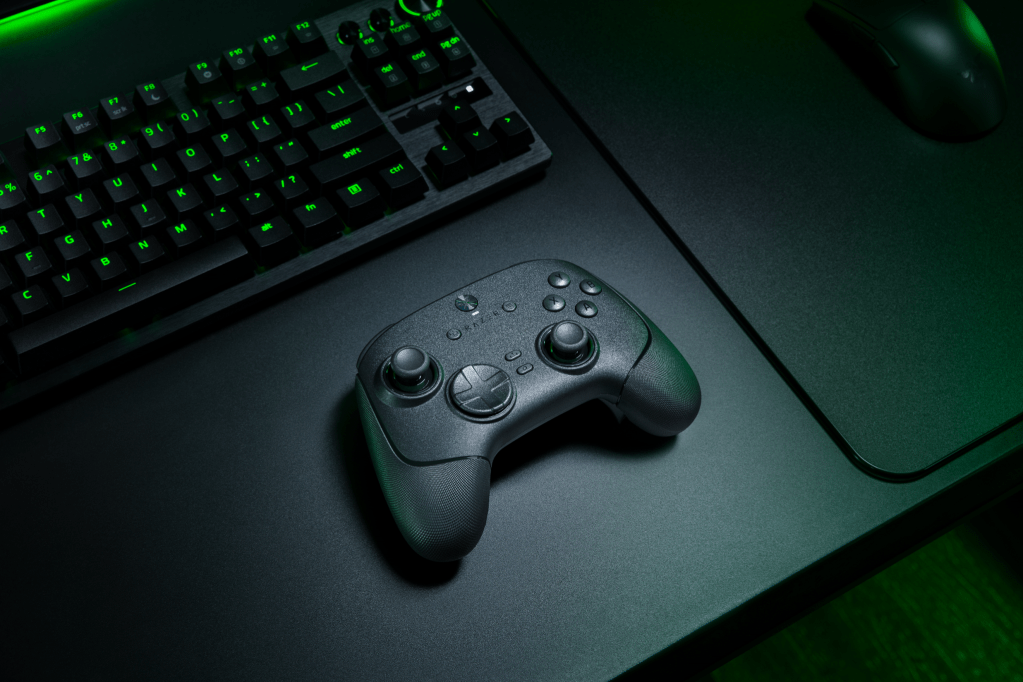
Razer is well-known for their slew of gaming peripherals and they’re determined to get their controllers into the hands of every PC and console player in the market. Razer was kind enough to send over one of their latest PC controllers: the Wolverine V3 Pro 8K PC (a mouthful, I know), so let’s talk about whether or not this controller is right for you!
Disclaimer: Razer sent us this free review unit, but we do not accept gifts or payment for positive reviews. All of our reviews are based on our honest opinion.
Razer Wolverine V3 Pro 8K PC
First things first, we have got to talk about the name. Razer…what is this naming scheme? There are way too many parts to this thing. It feels like whoever was in charge of naming it just wanted to throw in as many keywords as they could and this is what came out of that.
Now that we have that out of the way….
READ MORE: I’m really impressed with the Razer Firefly V2 Pro
The controller itself
Razer is marketing this as a very competition-first controller, which means they’re likely expecting players will use this mostly for competitive shooters or fighting games.
I believe I bring an interesting perspective to this controller because I play…neither of these genres. I’m too washed to play shooters competitively (and if I wasn’t, I’d be playing on keyboard and mouse) and I’ve never really gotten the hang of fighting games past beating the hell out of some CPU on easy mode in Mortal Kombat 11.
However, like many PC players, I do still find myself picking up a controller for a great many games outside of these genres. For example, Borderlands is a rare shooter that I’ve always felt plays better with a controller as opposed to typical keyboard/mouse controls.
The recent launch of Borderlands 4 has proven to be an excellent testing ground for the Wolverine V3 Pro 8K PC and while it’s not necessarily designed for people like me, I can certainly see why people would love it.
What I like
Buttons
Let’s talk about the things that I find really nice about this controller. I’m a huge fan of the mecha-tactile face buttons and d-pad, as well as the claw grip bumpers; if I could take all of these from the Wolverine and slap them on my Flydigi Vader 4 Pro, I’d have just about my perfect controller right there.
One of my biggest gripes with controllers is how mushy the face buttons feel, especially after you’ve used them and worn them down after a while. The Wolverine’s mecha-tactile buttons feel super responsive and satisfying to press, removing that mush from typical membrane face buttons.
READ MORE: Reolink has turned me into a monitoring mogul and I love it
And the claw grip buttons, while they don’t get too much use so far, have come in handy more often than I’d have thought given that I don’t play claw, but Razer has done a great job at positioning these inputs such that they feel natural in either grip. +1 for the Wolverine!
Razer’s Pro HyperTriggers do feel nice, albeit fairly similar to most other “pro” controllers I’ve used previously. Not world-changing or anything, but they do feel good.
The d-pad is probably one of my favorite parts about this controller; just running my thumb around it and feeling the crispiness of each click feels so nice. It seems like Razer is really the only company that’s been able to get a d-pad to feel exactly how I want it to, and I wish more companies would take notes from this. Another +1 for the Wolverine.
Software
Now, let’s talk software for a minute. I am typically a pretty huge hater of any and all peripheral software. I despise nearly every single thing about all of it, from the prompt you get when you plug in a new accessory to the bloatware that you have to opt out of when downloading the one tool you need — it’s a pretty awful experience.
That being said…I have to say that Razer Synapse has come a pretty long way. I still strongly dislike the whole installation process, but when it actually comes to customizing the Wolverine V3 Pro 8K PC? It’s actually really simple, and there’s so much to customize. You can remap any button to whichever input you want — including setting macros and keyboard shortcuts.
I would prefer to have an on-device way to remap buttons, just as an alternative so you don’t have to download extra software if you don’t want to, but I’ll give it a pass this time just because of how easy it is to remap everything once you’re in the software.
READ MORE: I can’t take my eyes off the wall, and it’s because of the XGIMI Horizon S Max
What I don’t like
As I mentioned before, the Razer Wolverine V3 Pro 8K PC is designed specifically for competition, and as I also mentioned before I do not play competitive games. I acknowledge that I am not in the target demographic for this controller and as such, the few downsides I have will not necessarily be viewed as such from competitive players….so take the following with a grain of salt.
Weight
Unlike what seems to be the vast majority of players, I actually prefer a bit of weight — some heft, if you will — to my controllers. Something about feeling that weight in my hands makes it feel just a bit more premium. However, I know that is not always the case as the Xbox Elite Controller is the heaviest controller I own and is also the controller I like the least.
That said, at just 220 grams I do find the Wolverine to be fairly light for my taste. In my experience, I’ve found the Flydigi Vader 4 Pro strikes the perfect balance of heft-to-comfort.
Also of note: if your hands are on the larger side like mine the Wolverine feels just a little bit small, which might lead to some cramping during longer gaming sessions.
No rumble
Another minority opinion, but one of the reasons I enjoy playing certain games with a controller is that haptic feedback from the rumble motors. I know it tanks battery life and adds unnecessary weight to the controller, which is why Razer doesn’t include them, and why comp players don’t want anything to do with it, but I like it! I like my controllers rumbly!
Thumbstick tension
One thing I think at least most of us out there can agree on is that adjustable thumbstick tension is a must. Most of the major pro controllers out there have adjustable thumbsticks, and I have to say I’m a little disappointed this seems to be one of the few things Razer has yet to implement.
Sure, you can adjust the stick sensitivity within the Synapse software, but it produces nowhere near the same effect as physically adjusting the tension on the thumbsticks.
Razer has to know that a general “one size fits all” thumbstick tension doesn’t work for every game, and if they’re intending for this to be a competitive controller it has to be able to adapt to those other games.
Don’t get me wrong, the Wolverine V3 Pro 8K PC can adapt in a lot of ways, unfortunately the lack of adjustable thumbstick tension in a $200 controller is hard to overlook.
Power button
One relatively minor nitpick is that it takes forever to turn the controller on. Like, almost a full five-second press-and-hold. Not the biggest deal in the world, but when it feels like every other controller turns on instantly…-1 for the Wolverine.
Should you buy one?
That depends. If you’re like me and you mostly intend on playing single-player RPGs or any non-competitive shooters…I would tell you to save the $130 and buy the Flydigi Vader 4 Pro for $80 on Amazon.
However, if you do play a lot of competitive games — and I’m talking probably tournament-level competitive — yeah, I feel good giving this my stamp of approval.
For $200, you’re mostly going to be looking at either the Xbox Elite Series 2, PDP Victrix Pro BFG (haven’t personally used) or the Razer Wolverine V3 Pro 8K PC — to me, that’s a no-brainer decision. Go with the Razer here.


 Wallflower Writing
Leave a comment